Case Study: HERE / The BMW Group
To comply with my non-disclosure agreement, I have omitted and obfuscated confidential information. All images are not readable to protect company information. The information in this case study is my own and does not necessarily reflect the views of Cloud Technology Partners, HERE or The BMW Group
Goal
Newer cars have a vast number of sensors that report various types of information. This includes things like weather conditions, sudden braking, turn radius, collision reports and more. That information is collected, filtered and used by data scientists and engineers to produce better automobiles but there wasn’t an application designed to do all of that.
The project goal was to create a centralized interface supplying all the analytical data the data scientists and engineers required. The back-end of the application was to use a mixture of Amazon Web Services and Hadoop Storm Clusters. The UI would be built using Bootstrap.
Research
To build the front end of this application it took many hours of research and a lot of questions. I was brought onto this project relatively late in the process all requirements had been gathered and any documentation was written solely for the back-end development.
My first goal was to understand what this application did and what certain technical terms meant.
To work through this I read as much of the back-end and requirement documentation as I could find and when it didn’t make sense I would speak with the Senior Software Lead to answer my questions. I also took opportunities to play with some of the technology and read some developer blogs about it. Having this baseline allowed me to understand the technical difficulties and capabilities to make a more developer friendly design.
The second goal was to find out what platforms would this application be used on; ultimately this is a web based desktop application with no mobile component.
The third was to figure out who the users are and how would they interact with the application and for what reason.
The unique challenge of this phase was that I could not interview the actual end users. To compensate for this I interviewed a mechanical engineer, a developer (not on the project), a German national and an analytics specialist. When I could I spoke with them in person and if not I sent an email with some very basic questions. I compiled all this information and used it as a starting point for creating the personas and user flow.
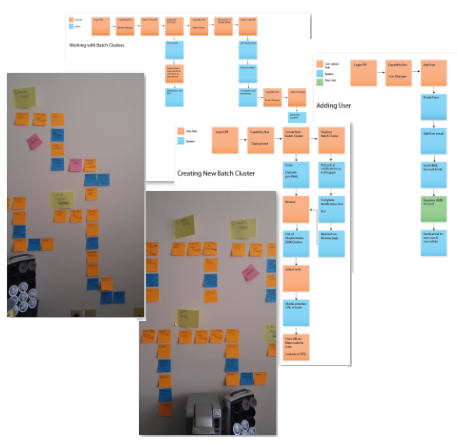
User Flow (intentionally blurry)
Creating Personas
I find that before anything else gets done, in my process I like to have people to “talk” to. This is where the personas become key for me. I settled on four different personas based on the application goals and what was currently being developed.
Without disclosing any actual information my personas all had the following information attached to them:
- A brief biography of their life, technology uses and personality traits
- A daily routine for how they work and what they do
- Top 5 technological needs and why they have these needs
I used stock photos to give my people a face and kept printouts of these on my designer’s wall so that when I needed to talk with them I could put a face to our conversations.
The final persona write ups were put on the company’s Confluence site so that it could be referenced by everyone on the team.
I tend to go for more substance than a pretty style with my personas and so I didn’t give the final persona reports any kind of graphical treatment. I found this approach to work better with this team because of the tight deadlines and the focus was more on the information than the style.
Creating Flow
Once my people were in place, it was time to figure out what their tasks were and what kinds of steps would they take to accomplish this task. To do this I took the pieces of the application, assigned a persona to it and then began with the basics.
I did not do this alone, instead I met with the Software Lead and ran through a few different Ideation exercises to build out not just what the user would do but what the system response would be. We worked on this in a coffee shop with colored post it notes and markers. Not only was this a fun way to spend an afternoon, it also helped the Lead to figure out a better programming structure for the application.
Creating the Wireframes
Much of my world is in grey, black and white; which worked well because the company already had a dedicated branding team to apply the final graphics. The wireframes used Bootstrap elements (typical button shapes, preferred icons from Font Awesome and general style) and were built in Adobe Illustrator.
I then cataloged, in the Confluence site, all the wireframes adding in notes and keeping them in order of user flow. By having organization like this it gave the developers a powerful resource to refer to and add in their additional thoughts.
In total, there were over 40 wireframes created and documented for this project.
Conclusion
This was a unique project that had many challenges going in including technology limitations, no access to end users and bringing in UX late in the development cycle. The deadlines were tight but with careful planning all the goals were accomplished within the deadlines.
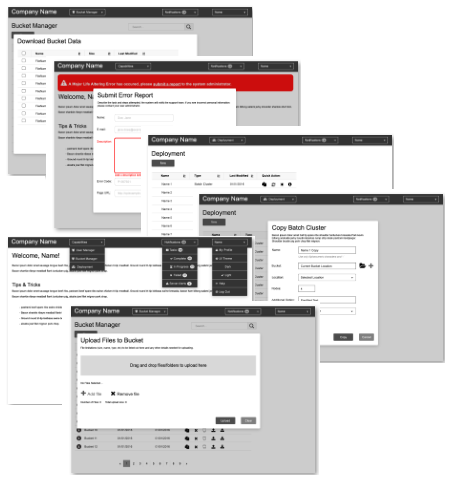
Wireframes (intentionally blurry)